

Tables now works in ChatGPT. Add it once, and ChatGPT can search Tables for the people you want to call, save them to a list, score them with AI, get mobile numbers and send them to your CRM, all from the chat.
Ask for the people you want to call
Write it the way you would say it, like “Find heads of sales at software companies in Denmark with 50 to 200 employees”. ChatGPT turns it into a Tables search and shows you who it found. Ask it to narrow the list, leave out your customers or save it, and it does that too.
Everything Claude can do
It runs on the same Tables server as our Claude connector, so ChatGPT can do the same things. It can look up people by name or LinkedIn URL, find the right people at a company, run AI columns, import a CSV, export to CSV or Excel and send people to your CRM. The docs list every tool and what it costs in credits: see all the tools.
Credits work the same as in Tables. ChatGPT may ask before it uses a tool that spends them. Choose Allow once, or Always allow to stop it asking.
Add Tables to ChatGPT
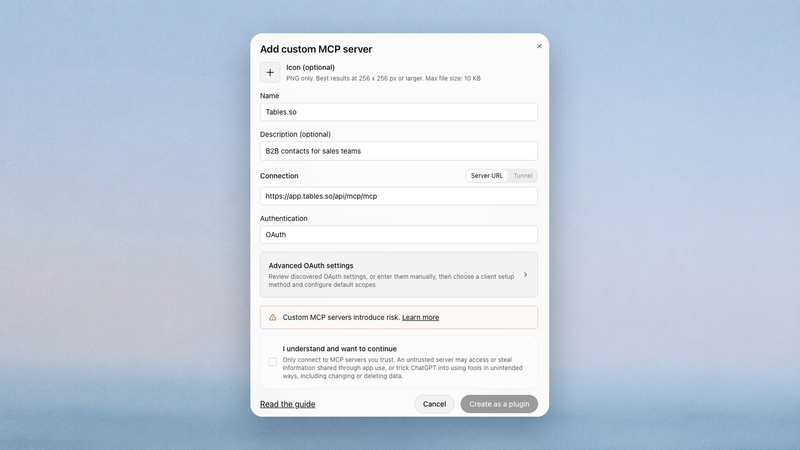
Tables.so isn’t in ChatGPT’s plugin directory yet, so for now you add it as a custom MCP server. It takes about a minute:
- 1Open ChatGPT’s plugins, click Add and choose Add custom MCP server.
- 2Name it Tables.so, paste the server URL from our docs, choose OAuth and click Create as a plugin.
- 3Click Connect Tables.so, sign in to Tables and click Allow.
- 4Type @Tables in a chat, or just ask for the people you want to call.